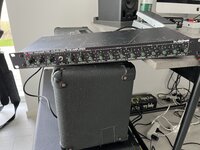
Help setting up TC 1140 para EQ

  • Thread starter Thread starter peterc52
  • Start date Start date
peterc52

peterc52

Well-known member
Never tried one before. How does it work? Can you show me towards a setting to start with?

Right now it’s in front of a old 2203 D2C92387-9F20-4452-A728-35A6BA32A985.jpeg
 
Do you know how parametric equalizers work? Center, width and gain per band?

But apart from the general stuff, you plug into the Preamp input to engage the preamp. Turn up the input gain a bit to get your guitar to a proper line level for the EQ section to work with, keep the EQ bands in bypass for now (there is no bypass for the whole thing, it´s just the EQ section you turn on and off with the toggle) and keep the output low to where you think you have about the same signal as without the unit. Engage the bands, dial them in one by one and start tweaking the balance between working with specific bands and boosting the whole output signal.

The EQ match knob is just to keep the output level the same when you engage the EQ bands if you bring them in and out a lot. Maybe mostly handy to isolate volume differences from actual tone when you check your settings by going to neutral with the bypass.

Most people use these to cut bass below 100 and boost mids in the 500-700 range. Boosting with a small bandwidth can get super honky, I´d start with it at noon.
 
Thank you! No I don’t know much about center, width or gain as well :/

Only ever messed with the onboard eq on Mesa.
 
Well, compared to a graphic EQ you can simply put choose what frequency the slider sits at and how much the curve in either direction will spread out lower and higher from that center. The shape of the boost or cut, so to speak. Then you just mess with the level as usual. Think of the whole thing as four graphic sliders with fancy extra versatility.

In front of an overdriven amp you don´t get nearly as much tonal change as with the Boogie EQ, which is after the preamp. It´s definitely more like a boost pedal in this position.
 
Last edited:
The “Q” is how wide or narrow the cut of the EQ is. The bigger the number ( say, a Q of 4 or 10 or whatever) the more narrow the cut is, and more precise. The smaller the number ( like say, 1 or .5 etc) the more wide the cut or boost is. When you boost or cut a frequency you have selected on the parametric eq, you aren’t just boosting or cutting that specific frequency, you are boosting and cutting tons of frequencies around that particular point. Different eq’s have different curves therefore they have different tonality. This is the basics.


All cool right? It is, but it can be tricky, and you can easily run into phase problems when using an eq like this, but don’t worry about that too much right now. What IS important to remember is, generally the wider the Q, the more transparent the cut or boost will be. This is my preference, as it sounds more natural this way and less colored or noticeable that something is EQ’d. Narrow the Q as small as it can go ( probably 4 or so on that guy) and sweep through the frequencies until you find a resonancd you find particularly annoying… BE CAREFUL. It’s very easy to get crazy with this and start cutting everything and neutering the tone. It’ll get easier over time what to listen for though. Look for problems in the 3-500 hz area, and around 3-4K to start with. When you find something you don’t like, widen the Q back out to around 1, and start with a very small cut or boost, around 1db. It’ll make a big difference. This will keep it more transparent. Cutting stuff with a narrow Q is necessary sometimes for sure, but it’s easy to get carried away and often sounds less natural. Those kinds of problems can often be fixed at the source as well ( mic placement, mic, cabinet etc) But again, be careful around 3-4K, a lot of your pick attack and tone lives here.


This is the basics of a parametric. Again, I like using wider Q’s for boosts and cuts, it just sounds better to me.

 
That is very solid advice on equalizing, for sure, but maybe not quite as applicable if running it as a boost before a 2203 like Dime or Doug Aldrich does, which I gather is what we´re looking at here. A lot of the finer nuances get squashed in a pre-preamp situation.
 
That is very solid advice on equalizing, for sure, but maybe not quite as applicable if running it as a boost before a 2203 like Dime or Doug Aldrich does, which I gather is what we´re looking at here. A lot of the finer nuances get squashed in a pre-preamp situation.


Absolutely true. I might have misread that then. I apologize. For what it’s worth, the 1140 is a fantastic eq in the loop, and I know many who use it exclusively in their studios, it’s great for sure, good score.
 
Nothing to apologize for!

It´s a wonderful tool. I´ve used mine in the loop, as a boost and as a stand-alone preamp for those cleaner than clean straight-to-desk rhythm tones.
 
Thank you very much guys! I have a HF loop laying at my desk. Might as well get it installed!

Also intend to use this for my IIC+ in the loop. Since I couldn’t find an Aphex ???
 
What Aphex? To me all their stuff feels like $50 garage sale finds at this point, but maybe I´m not up to speed.
 
What Aphex? To me all their stuff feels like $50 garage sale finds at this point, but maybe I´m not up to speed.
The EQF-2. It's only because its what Flemming used on MoP and Justice. Total fanboy over here :ROFLMAO:
 
Back
Top