TwoNotes Genome 2.0: Clip and NAM profile of Mark IV Inside

  • Thread starter Thread starter nightlight
  • Start date Start date
N

nightlight

Well-known member
You can get a free version, I got the paid version for free because I have a CabM+, and there's a pricer "suite.

Tried it out last night and it was awesome sounding and feeling. The static captures were on point.

Right now running a capture of my VHT GP3 preamp. Takes hours, but does what everyone wanted from the Kemper and QC, which is a capture of the amp tonestack.

Thinking of trying this out as an ipad rig.
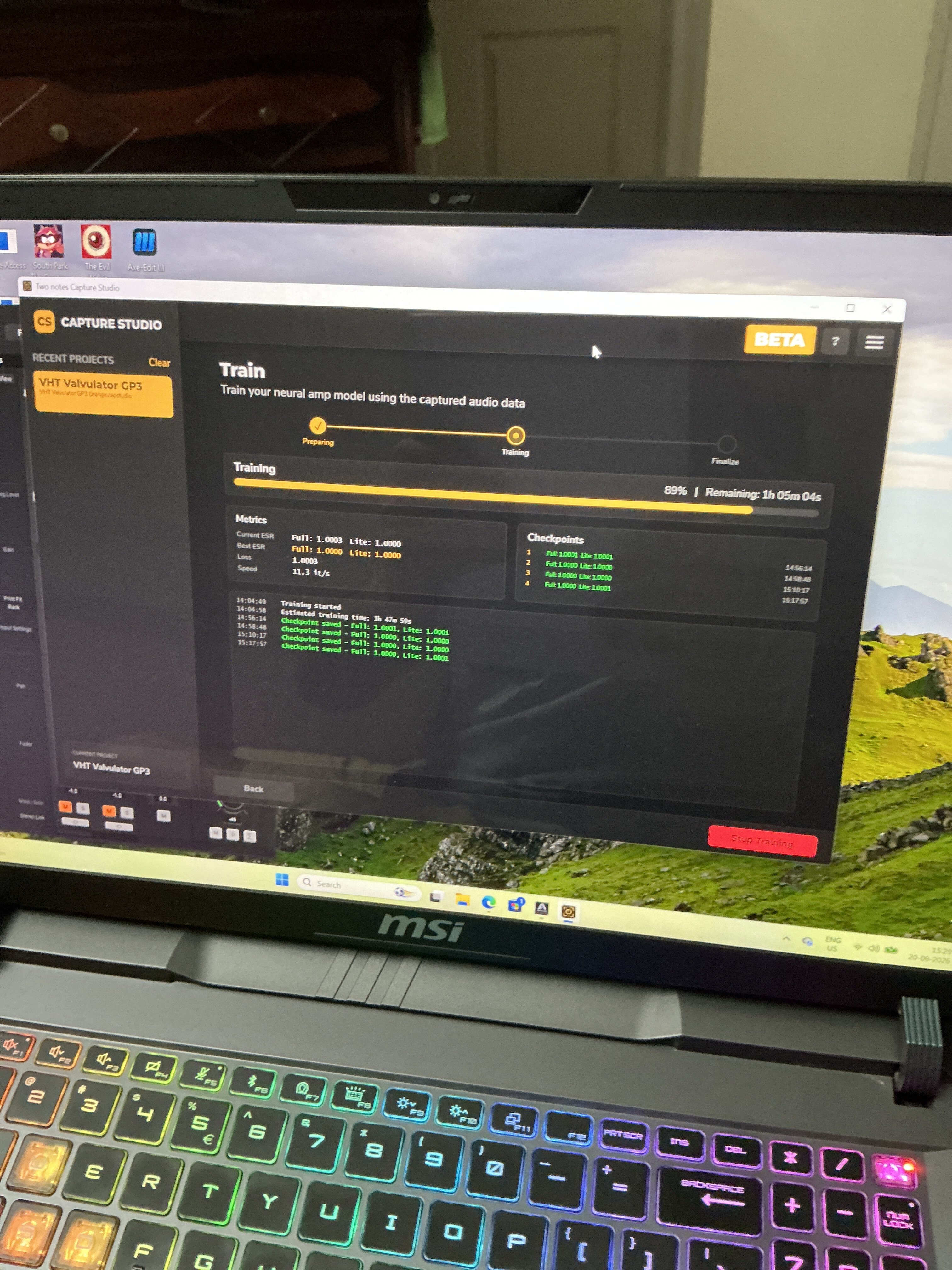
image.jpg
 
I am going to dig into this on the weekend..twonotes has really been hitting some homeruns lately and this is def next level. I got tue software free with my cab m as well so no brainer to try it out. So now I can model or capture my own amps with the option of the cab OR better cabs in genome. Might just replace a mic for me. The time to setup and the volume I want can be limiting. Feel sorry for big studios, increasingly new products like these will hurt business. Consoles are essentially becoming big analog summing boxes. ( which is actually an area digital still can't copy, the width and depth of analog when summed)
 
You can get a free version, I got the paid version for free because I have a CabM+, and there's a pricer "suite.

Tried it out last night and it was awesome sounding and feeling. The static captures were on point.

Right now running a capture of my VHT GP3 preamp. Takes hours, but does what everyone wanted from the Kemper and QC, which is a capture of the amp tonestack.

Thinking of trying this out as an ipad rig.

View attachment 450687

This capture I was doing was a waste of time. No output at all. Tried doing it again and it was a complete waste of time. The Capture Studio Beta software is really buggy, and there's no way to tell if you're on the right track until right at the end of the process, which takes hours. So caveat emptor, this may take a while to be a usable capture device.
 
Paying this forward: I spent a couple of days that were largely wasted due to what I suspect is a dud cable that has prevented me from getting good results from Genome 2.0 and Capture Studio. So what I did was capture a Mesa Boogie Mark IV head into an Orange 2x12 cabinet miced up with a Sennheiser E906.

Looking at the error-to-signal ratio, this capture was almost spot on. Here's a screenshot:

Screenshot 2026-06-21 155059.png


The resultant profile is fun to play, and this has really cooled my GAS to get another Quad Cortex.

I also found that the MixFit section of Genome is awesome for tweaking captures to get the best results in a mix.

Here are two recordings. The first is just the amp I captured without any processing other than a preamplifier. The second is using MixFit to gently massage the tone in a direction that made sense to me at the time.


If this interests anyone, you can download this capture for free. It's in this Onedrive file. Enjoy

Mark IV E906 Channel 3.nam
 
I have a hard time playing through genome..sounds good on playback but playing through it is not that inspiring. Probably better through a tandalone device vs on the comp I would think.
 
I have a hard time playing through genome..sounds good on playback but playing through it is not that inspiring. Probably better through a tandalone device vs on the comp I would think.
I'm using it on my iPad now as a lightweight grab and go rig with an Apogee Duet 3 as the interface

Don't quote me on this, but there's less latency using this plugin versus some of the modellers I've tried. Could just be confirmation bias, but I noticed it on palm mutes.

Also, a big apology to anyone who found that clip or the capture underwhelming.

The software is in Version 01.1 and I found that sometimes the sound of the capture changes when I load it on different devices like my Windows laptop, Mac, or iPad.

Here is the same capture that I have shared using an ipad to record instead of loading it on my Mac.


EDIT: Here's a clip of the iPad rig feeding a PS-2 and Orange 2x12. Sorry it's camera audio, I don't have another interface in this room, so you can hear string noise.

 
Last edited:
Paying this forward: I spent a couple of days that were largely wasted due to what I suspect is a dud cable that has prevented me from getting good results from Genome 2.0 and Capture Studio. So what I did was capture a Mesa Boogie Mark IV head into an Orange 2x12 cabinet miced up with a Sennheiser E906.

Looking at the error-to-signal ratio, this capture was almost spot on. Here's a screenshot:

View attachment 450849


The resultant profile is fun to play, and this has really cooled my GAS to get another Quad Cortex.

I also found that the MixFit section of Genome is awesome for tweaking captures to get the best results in a mix.

Here are two recordings. The first is just the amp I captured without any processing other than a preamplifier. The second is using MixFit to gently massage the tone in a direction that made sense to me at the time.


If this interests anyone, you can download this capture for free. It's in this Onedrive file. Enjoy

Mark IV E906 Channel 3.nam

Glad to hear you got up and running in the end! You are absolutely right, Capture Studio is still very much in Beta so if there's something you'd like to see, let me know and I will gladly feed this back to our dev team!
 
I have a hard time playing through genome..sounds good on playback but playing through it is not that inspiring. Probably better through a tandalone device vs on the comp I would think.
Thanks for reaching out and I'm sorry to hear this. It would be great to understand a little more concerning the lack of inspiration and what was missing for you; once received, I will gladly feed this back to our team!
 
I'm using it on my iPad now as a lightweight grab and go rig with an Apogee Duet 3 as the interface

Don't quote me on this, but there's less latency using this plugin versus some of the modellers I've tried. Could just be confirmation bias, but I noticed it on palm mutes.

Also, a big apology to anyone who found that clip or the capture underwhelming.

The software is in Version 01.1 and I found that sometimes the sound of the capture changes when I load it on different devices like my Windows laptop, Mac, or iPad.

Here is the same capture that I have shared using an ipad to record instead of loading it on my Mac.


EDIT: Here's a clip of the iPad rig feeding a PS-2 and Orange 2x12. Sorry it's camera audio, I don't have another interface in this room, so you can hear string noise.


Thanks for bringing this to our attention - rest assured our team are looking at this apparent discrepancy right now! :)
 
Glad to hear you got up and running in the end! You are absolutely right, Capture Studio is still very much in Beta so if there's something you'd like to see, let me know and I will gladly feed this back to our dev team!

A few things:
1) The ability to edit knob names during and after creation
2) The software should be able to tell if there's no input signal, or if there's too much noise, or generally if there's something wrong during the capture process. I spent many hours trying to figure this out before I realised I had not set my DI box correctly during previous attempts.
3) Is there any way to be able to monitor your guitar when you start creating the capture? This would help dialling in the tone. Same applies for after the capture is created. The presets for auditioning won't give you and idea, because you may have a radically different guitar.

Just shot a How To video on Genome 2.0 when crafting presets using Paradex. Here it is:


The preamp is an Engl E530. And here's the data on the capture accuracy.

Screenshot 2026-06-24 165935.png
 
A few things:
1) The ability to edit knob names during and after creation
2) The software should be able to tell if there's no input signal, or if there's too much noise, or generally if there's something wrong during the capture process. I spent many hours trying to figure this out before I realised I had not set my DI box correctly during previous attempts.
3) Is there any way to be able to monitor your guitar when you start creating the capture? This would help dialling in the tone. Same applies for after the capture is created. The presets for auditioning won't give you and idea, because you may have a radically different guitar.

Just shot a How To video on Genome 2.0 when crafting presets using Paradex. Here it is:


The preamp is an Engl E530. And here's the data on the capture accuracy.

View attachment 451221

Thanks so much for the feedback here - we sincerely appreciate it. Consider it fed back to our team now! :)
 
Hi Guys,

I am pleased to report that GENOME Desktop 2.0.3 is Now Available

We've released GENOME Desktop 2.0.3, a maintenance update focused on stability, performance and workflow improvements.

➡️

Bug Fixes
Fixed a startup crash that could occur if GENOME was unable to locate the Resources folder.
Fixed MixFit MIDI assignments not being correctly recalled.
Fixed a mismatch between the CODEX Gain control and audio processing when switching between Normal and Extended Gain ranges.

➡️

Performance Improvements
Optimized UI and audio graph processing, reducing overall CPU usage.
Optimized oversampling processing, reducing CPU usage with no impact on audio quality.
Optimized the Transpose algorithm, reducing CPU usage with no impact on audio quality.
Improved mono processing efficiency by preventing Transpose from processing in stereo when GENOME Input Routing is configured for a mono input.

We recommend all Desktop users update to version 2.0.3 to benefit from the latest fixes and performance enhancements.

Download the latest version here: https://www.two-notes.com/en/downloads/
 
Hi Guys,

I am pleased to report that GENOME Desktop 2.0.3 is Now Available

We've released GENOME Desktop 2.0.3, a maintenance update focused on stability, performance and workflow improvements.

➡️

Bug Fixes
Fixed a startup crash that could occur if GENOME was unable to locate the Resources folder.
Fixed MixFit MIDI assignments not being correctly recalled.
Fixed a mismatch between the CODEX Gain control and audio processing when switching between Normal and Extended Gain ranges.

➡️

Performance Improvements
Optimized UI and audio graph processing, reducing overall CPU usage.
Optimized oversampling processing, reducing CPU usage with no impact on audio quality.
Optimized the Transpose algorithm, reducing CPU usage with no impact on audio quality.
Improved mono processing efficiency by preventing Transpose from processing in stereo when GENOME Input Routing is configured for a mono input.

We recommend all Desktop users update to version 2.0.3 to benefit from the latest fixes and performance enhancements.

Download the latest version here: https://www.two-notes.com/en/downloads/

Thanks, Ross. I appear to have encountered a similar bug on iOS, where the app crashes on launch. Could that be looked into as well, please? Not sure if it has any bearing, but could be happening when I close the app the previous time with one of my own captures.
 
Thanks, Ross. I appear to have encountered a similar bug on iOS, where the app crashes on launch. Could that be looked into as well, please? Not sure if it has any bearing, but could be happening when I close the app the previous time with one of my own captures.

Thanks for getting back to me. Good news! We have just released an iOS update! Details below...

📢 GENOME iPad 2.0.3 Now Available

We've released GENOME iPad 2.0.3, bringing new functionality alongside a range of stability, performance and workflow improvements.

➡️ Feature Updates

GENOME now continues processing audio while running in the background.

➡️ Bug Fixes

Fixed an issue that could cause GENOME to become stuck in an infinite loading loop for users who had previously enabled the GENOME 1 Trial.

Fixed various crashes and unexpected application shutdowns when interacting with the user interface.

Fixed MixFit MIDI assignments not being correctly recalled.

Fixed a mismatch between the CODEX Gain control and audio processing when switching between Normal and Extended Gain ranges.

➡️ Performance Improvements

Optimized UI and audio graph processing, reducing overall CPU usage.

Optimized oversampling processing, reducing CPU usage with no impact on audio quality.

Optimized the Transpose algorithm, reducing CPU usage with no impact on audio quality.

Improved mono processing efficiency by preventing Transpose from processing in stereo when GENOME Input Routing is configured for a mono input.

We recommend all GENOME iPad users update to version 2.0.3 to enjoy the latest improvements.

Download the latest version from the App Store today: https://apps.apple.com/app/id6759730714
 
Thanks, Ross. I tried this and a Paradex preset I made got completely messed up, there was only input and output knobs

Another issue on another preset was when I tried to delete a split. The software kept crashing on iOS the three times I did this.

However, it didn't crash once while loading, so that's a plus point.
 
Thanks, Ross. I tried this and a Paradex preset I made got completely messed up, there was only input and output knobs

Another issue on another preset was when I tried to delete a split. The software kept crashing on iOS the three times I did this.

However, it didn't crash once while loading, so that's a plus point.
Thanks for getting back to me. I am very sorry to hear this.

I think it may be best to speak to our support team as I have not received any issues like this since the update was released and suspect it might be an isolated case. Could you submit a ticket at Support.Two-notes.com - once submitted, please let me know your ticket number and I will make sure this is fast tracked for you! Thank you!
 

Similar threads

Back
Top