I
innogator
Active member
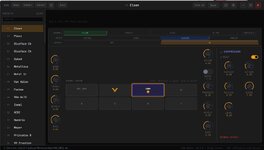
Hey everyone, I just picked up a VHX last week and have really been enjoying the amp. After a while of building out presets I really kept wishing there was an easier way to manage them and from what I've seen others have felt the same way. Seems like an official editor was in the works at some point but I haven't seen any updates in a while so I decided to create one.
Here's some of the key features:
Download: https://github.com/Innogator/diezel-vhx-editor/releases
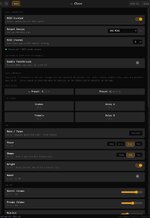
Screenshots attaches. Hope this is helpful for someone. Happy to hear feedback or ideas!
- Bryan
Here's some of the key features:
- Visual preset editor - control all amp parameters, reorder presets and fx, backup settings, etc
- Preset sharing - presets can be copy/pasted as json or the entire bank can be exported to share with others
- MIDI live control - realtime control of MIDI settings through Bluetooth or USB and can act as a passthrough for other MIDI control devices
- Works on Windows, Mac, and Linux
- Live preset switching isn't supported due to current firmware limitations of the amp, however MIDI can control parameters in real time (boost, voice, shape, FX slots, volume, etc.) but not certain parameters like gain structure or gain level
- I have been using and testing this on amp firmware 5.0.4 but can't speak to other versions
- I built this as a personal project for my use and am sharing it publicly, no guarantees and use at your own risk
- Finally, I'm not affiliated with Diezel in any way, just felt like a need for this awesome amp
Download: https://github.com/Innogator/diezel-vhx-editor/releases
Screenshots attaches. Hope this is helpful for someone. Happy to hear feedback or ideas!
- Bryan