I went from a Kemper to an AxeFX and it was a great decision.
I bought the Kemper in 2020 and while I thought it was really neat, the tech already felt dated
then and it's six years later. The main issue for me was the Rig Manager. It was absolutely awful software. Difficult to use, not intuitive, old fashioned; it felt like using iTunes. Using the knobs and switches on the unit was not any better as there's no touch screen and the screen that is there looks like an 80's hand-held video game. I know they have recently updated the Kemper but it looks mostly superficial except for the liquid profiling, which addressed the huge "snapshot" weakness of the Kemper. The real proof is in the pudding, though, and that's that if you look around, everyone is unloading their Kempers. There are just
SO many better solutions now, everything from tiny ToneX pedals to huge pedalboards and rack units.
I think the AxeFX is amazing. It's everything I wanted the Kemper to be. The only thing about it that sucks is that there is no profiling/capturing; but, in my opinion, most captures/profiles done by regular dudes at home suck. The best Kemper profiles you have to buy, so expect to be doing that. The AxeFX is all-in-one and the models sound
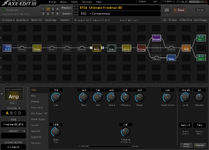
far superior to any patch I played on the Kemper. But the best part of the AxeFX, by far, is their computer app, the AxeEDIT III. It's absolutely incredible. It's easy to get started with the visual signal chain map and yet it can take you
allllllllllllll the way down the rabbit hole if you want to. Some people get thrown off by this and call it "option paralysis" or "digging through menus" but you don't
have to do any of that to make the AxeFX sound great. There's a ton of studio-quality effects that will work with any outboard gear, for example a guitar amp with a Line Out. It's great for re-amping, too. There's just
so many things it can do and at the end of the day, it's not really
that expensive.
Here are a couple of quick tips and tricks for you:
- Go into your Cab Block and dial the high pass to 80Hz and the low pass to 7000Hz. This will immediately make the AxeFX sound more like a real guitar amp in the room instead of a digital FRFR box. Don't be shy about adjusting them more aggressively. For example, some speaker IR's like the ML Sound Lab Greenback, have a lot of rumbling bass that requires the high pass to go up to 120hz. Some amps like the Mesa DR are fizzy and can use a more aggressive low pass around 5500Hz. I know you're thinking "but my tone bruh!" Trust me, it will sound better and more like a real amp in the room.
- If you want recording-ready patches:
- Add a JFET Studio Compressor (i.e., an 1176) after your Cab Block. Make sure to change the compressor's input level to "Line" at the bottom right. (It is set to "Instrument" by default.) Use these settings: Threshold -40 | Ratio 4 | Attack 30ms | Release 20ms. Turn off the "Auto Makeup" and use the Level control instead.
- Consider adding a Parametric EQ to the end of your chain. Start with a dip of -3db at 6k with a Q of 8 and a dip of -2db at 300Hz with a Q of 6. Roll the second one around a little; it might sound best at 240Hz or 260Hz. Your guitar will instantly sound more "professional." If you want more "Marshall Kerrang" out of any amp, just add 3db at 1.1k with a Q of 10.
- Run your effects in parallel. Put a "dry" line through the center to your PEQ or Output. This is your uncolored guitar signal. Then put a "wet" line to the sides. Set the mix on each effect to 100% wet then use the Level control to adjust the effect. (See photo.) This will generally sound better and make the guitars "bigger."
Feel free to DM me if you have any other questions. Good luck!



 I mean
 .gif "guitar :m17:") … I understand some people don’t want to mess with a computer. Hardware is nice for plug & play. VSTs just offer a different world of possibilities. Sometimes I’ll even do a hybrid approach lol turning off the cab sim in the plugin & using a Radial JCR reamp box into A Bogner Barcelona (single channel clean) through whatever the cab flavor of the day is. Fun Frankensteiny stuff.
… I understand some people don’t want to mess with a computer. Hardware is nice for plug & play. VSTs just offer a different world of possibilities. Sometimes I’ll even do a hybrid approach lol turning off the cab sim in the plugin & using a Radial JCR reamp box into A Bogner Barcelona (single channel clean) through whatever the cab flavor of the day is. Fun Frankensteiny stuff.

 I haven’t given Tonex a go yet thanks for the insight! That will be next on my digital list
 I didn’t know you can make captures
  I’ll probably hit you up for some pointers if you don’t mind.


